Guides
Ways to use ESHANA
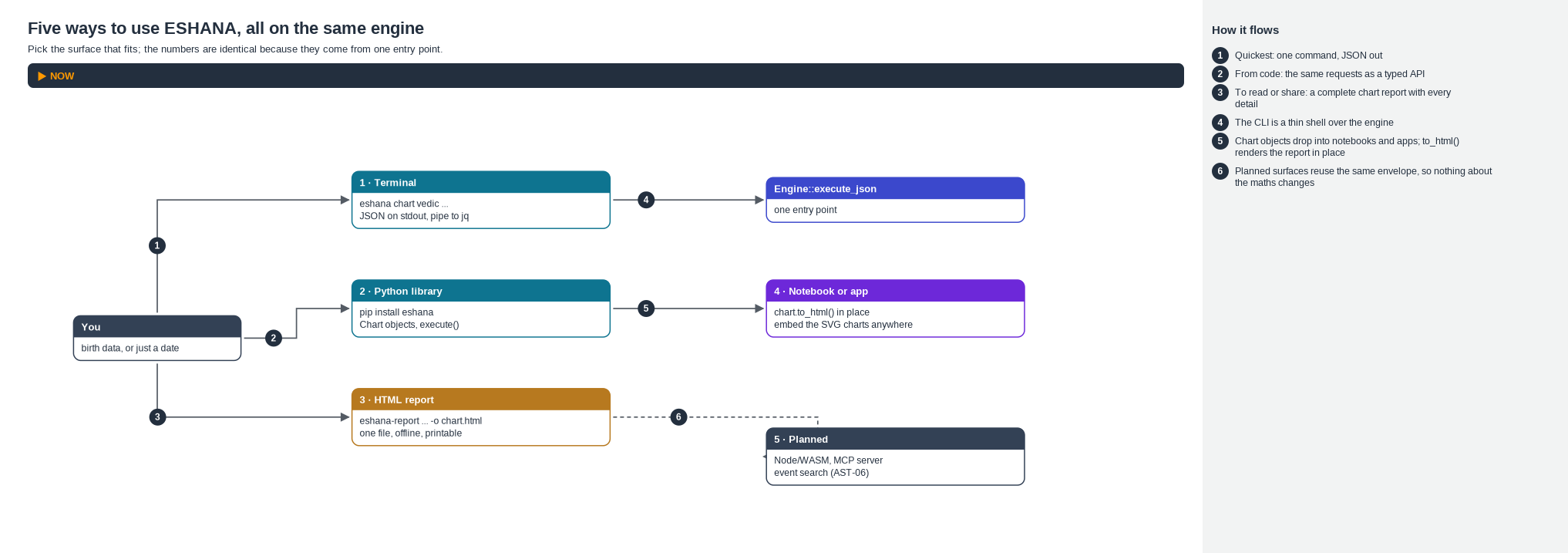
ESHANA is a set of libraries with thin front ends. Every front end calls the same Engine::execute_json, so the
numbers are identical whichever one you use.
| You want to… | Use | Install |
|---|---|---|
| look at one chart quickly | eshana chart vedic … (JSON) or eshana-report … -o chart.html |
cargo install --path crates/eshana-cli; pip install eshana |
| read or share a complete chart | HTML report | pip install eshana |
| compute from code | Python: ChartEngine, Context, Chart |
pip install eshana |
| explore in a notebook | a Chart renders inline in Jupyter; cookbook notebooks |
pip install eshana |
| feed another system | JSON envelopes (schema) | either |
| compute in a browser or Node | JavaScript and WebAssembly | bindings/js (make js) |
| let an assistant compute charts | MCP server: eshana-mcp |
pip install eshana |
| build it into a Rust program | eshana-engine crate |
path or git dependency (crates.io later) |
| see the maths behind a value | eshana explain, provenance in every envelope |
either |
| check the install | eshana doctor or ChartEngine.info() |
either |
1. Terminal
eshana chart vedic --date 1990-05-15 --time 14:30 --tz Asia/Kolkata --lat 28.6139 --lon 77.2090 \
  --divisions 1,9,10 --dasha | jq '.derived_attributes[] | select(.id=="vedic.moon.nakshatra") | .value'
eshana positions --utc 2026-11-20T12:00:00Z --zodiac sidereal --ayanamsha lahiri
eshana compare vedic --date 1990-05-15 --time 14:30 --tz Asia/Kolkata --a ayanamsha=lahiri --b ayanamsha=raman
eshana graph vedic --date 1990-05-15 --time 14:30 --tz Asia/Kolkata --lat 28.6139 --lon 77.2090 --format mermaid > chart.mmd
Every command and option is in the CLI reference.
2. Python library
from eshana import Context, ChartEngine, EshanaError

ctx = Context.from_local_birth("1990-05-15", "14:30", "Asia/Kolkata", 28.6139, 77.2090)
eng = ChartEngine()                      # or ChartEngine("spk", spk_path="de440s.bsp")
vedic = eng.vedic_chart(ctx, ayanamsha="lahiri", divisions=[1, 9], dasha=True)
print(vedic.attribute("vedic.moon.nakshatra"))   # {'name': 'Uttara Ashadha', 'pada': 2, 'lord': 'Sun', ...}
print(vedic.provenance["rulesets"])

try:
    eng.vedic_chart(Context.from_local_birth("2024-03-10", "02:30", "America/New_York"), ayanamsha="lahiri")
except EshanaError as e:
    print(e.code)                        # ESH-TIME-NONEXISTENT: that local time was skipped by DST
See the Python guide.
3. HTML reports
eshana-report --date 1990-05-15 --time 14:30 --tz Asia/Kolkata --lat 28.6139 --lon 77.2090 -o chart.htmlThe file holds the Panchang chakra, South and North Indian charts, vargas, daśā, the Western wheel, Human Design, numerology and full provenance. See HTML chart reports.
4. Notebooks and apps
chart = ChartEngine().vedic_chart(ctx, ayanamsha="lahiri", divisions=[1, 9], dasha=True)
chart                                   # Jupyter shows the report inline
from eshana.report import south_indian_svg, chakra_svg
svg = chakra_svg(chart.raw)             # drop a single chart into a web page
5. Batch jobs
import csv
from eshana import Context
from eshana.report import birth_report

for row in csv.DictReader(open("births.csv")):
    ctx = Context.from_local_birth(row["date"], row["time"] or None, row["tz"], float(row["lat"]), float(row["lon"]))
    open(f"out/{row['id']}.html", "w").write(birth_report(ctx, name=row.get("name")))
A row without a time still produces a report, with the time-dependent parts listed as not computed.
6. Other systems (JSON)
Every result is a versioned envelope (envelope reference,
schemas/envelope.schema.json). Store it, diff it, or render it later with
eshana-report --from-json.
7. JavaScript and assistants
The engine as WebAssembly for browsers and Node (JavaScript guide), and as an MCP server that an assistant can call (MCP guide).
Planned
A crates.io release of the Rust crates and the optional Swiss Ephemeris adapter (PROV-03). See the
roadmap and next steps.