Guides
ESHANA Studio (HTML chart app)
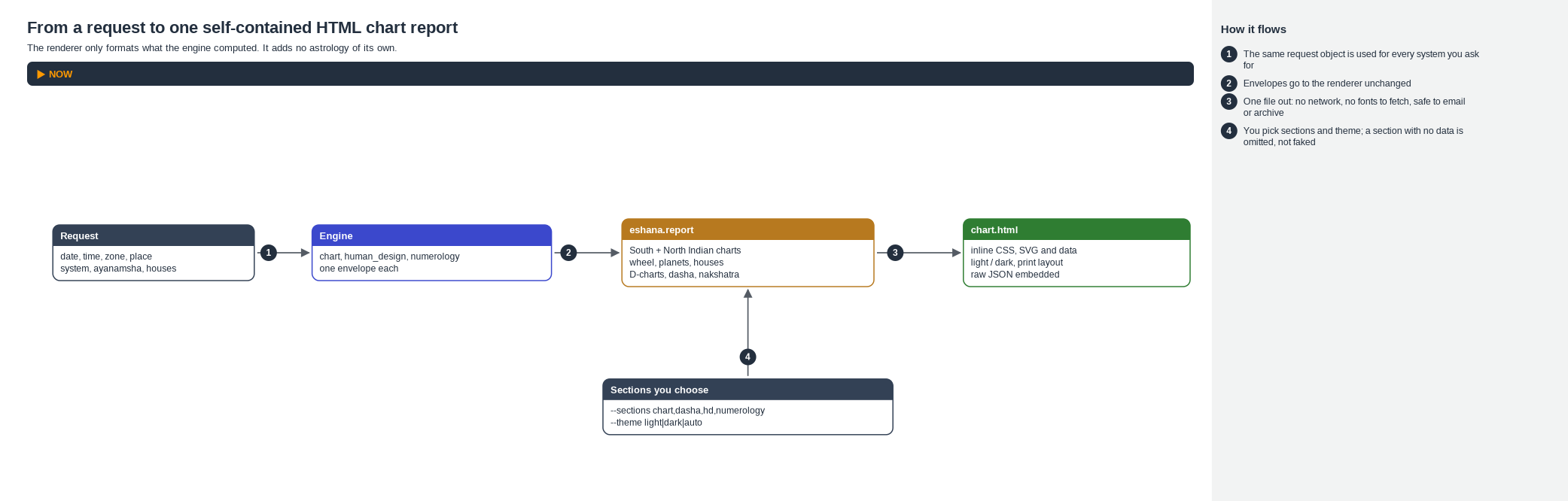
eshana-report turns a birth request into one interactive HTML file, ESHANA Studio: a multi-page app. The file holds every chart and table, the raw engine
output, a light/dark toggle and a print layout. It makes no network requests, so you can email it, archive it or
open it offline years later.
Examples, generated from the real engine: full birth chart · unknown birth time · Western + numerology only · rendered from saved CLI JSON.
From the command line
eshana-report is installed with the Python package (pip install eshana).
eshana-report --date 1990-05-15 --time 14:30 --tz Asia/Kolkata \
  --lat 28.6139 --lon 77.2090 --name "Example Person" --place "New Delhi, India" \
  -o chart.html
Unknown birth time: leave out --time. Positions and signs that stay the same all day are kept. The Ascendant, houses,
the North Indian chart and Human Design are listed under Not computed, with the engine’s reason, rather than
guessed.
| Option | Default | Meaning |
|---|---|---|
--date, --time, --tz |
none | local civil date and time in an IANA zone; --offset-minutes if you only know the offset; --utc for an instant |
--fold earliest|latest |
reject | which of a repeated local hour (DST fall-back) you mean |
--uncertainty-minutes N |
none | birth-time window ±N; values that could change are flagged |
--lat, --lon |
none | place; needed for the Ascendant and houses |
--name, --place, --title |
none | display only; --name also feeds name numerology |
--gender male|female |
none | shown with the name in the header; picks the person’s own Kua number (both are still listed) |
--ayanamsha |
lahiri |
lahiri, raman, krishnamurti, fagan_bradley, yukteshwar, jn_bhasin, ushashashi, sassanian, deluce, djwhal_khul, true_citra, true_revati, true_pushya, true_mula |
--houses |
whole_sign |
Vedic houses: whole_sign, equal, placidus |
--western-houses |
placidus |
Western houses |
--node |
mean |
mean or true lunar node |
--divisions |
all nineteen | vargas to include (D1 … D60) |
--no-dasha |
off | leave out Vimśottarī daśā |
--systems |
all four | any of vedic,western,human_design,numerology |
--school |
pythagorean |
numerology school, or chaldean |
--provider, --spk |
analytic |
use spk with a JPL kernel for sub-arc-second positions |
--features |
all |
Vedic features (see Vedic features), or none |
--dasha-levels, --dasha-systems |
3, vimshottari,yogini |
daśā depth and systems |
--reference |
now | instant for “current” periods and transits, recorded in the file |
--transit-start, --transit-end, --transit-step-days |
a year before to two years after --reference, 1 |
the transit series the chakra’s date picker and animation use (dates YYYY-MM-DD) |
--transit-days, --progression-years |
none, 90 |
centre a transit span of N days on the reference instead (0 = no transits); span of progressions |
--sunrise |
upper_limb_refracted |
sunrise convention for the pañcāṅga |
--partner |
none | second birth (date,time,tz,lat,lon) for compatibility |
--live |
off | embed the engine as WebAssembly (~4 MB): the compare workspace and the playground recompute offline (ADR-013) |
--locale |
en |
the file’s default interface language: en or hi. Readers can switch it under Settings → Interface language; their choice is kept in their browser. Labels only; values, numbers and dates are identical |
--calendar-days N |
none | a personal calendar of N days (≤ 62) from the reference date; --calendar-profile, --event-lat, --event-lon, --event-tz |
--kp-number N |
none | a KP horary page for number N (1–249) judged at --kp-at (default the reference instant) |
--icons, --chart-style, --centre |
sphere, south, south |
default planet icons, chart style and chakra centre (viewers can change them) |
--sections |
all | any of overview,chakra,charts,vargas,planets,planet,houses,house,aspects,strength,ashtakavarga,dasha,panchanga,special,yogas,kp,nadi,energetics,transits,progressions,western,human-design,numerology,matching,data |
--theme |
auto |
light, dark or follow the reader’s system |
-o |
stdout | output file |
A new chart from a form: eshana-report new
When you would rather type the birth details than write options, eshana-report new opens a form in your browser and
waits:
eshana-report new                      # writes ./<name>-<date>.html
eshana-report new -o charts/ --library ~/eshana-profiles.json- The command starts a small web server on
127.0.0.1(this machine only) at a free port, opens the form, and waits. Every URL carries a random token; requests from other sites or another host name are refused. - You enter the name, date, local time (or time unknown), time zone, place and settings. The form fills in your browser’s time zone; the zone you give is the birth place’s, and its historic offset is applied.
- On Create chart the engine checks the moment first. A missing field, or a time the clock skipped or repeated
(for example 02:30 on a spring-forward night,
ESH-TIME-NONEXISTENT), sends you back to the form with the reason and everything you typed. The command keeps waiting. - A valid entry is written to a new file (an existing file is never overwritten:
-2,-3… are added), shown in the browser, and saved as a profile revision when--libraryis given and the box is ticked. - The server then shuts down and the command prints the file’s path on standard output and exits 0. With no
submission it stops after
--timeoutseconds (exit 3); Ctrl-C stops it at once (exit 130). Nothing is written in either case.
| Option | Default | Meaning |
|---|---|---|
-o, --output |
. |
a directory (the file is named from the name and date) or an .html path |
--library FILE |
none | offer to save the birth in a profile library (eshana.profiles) as a new revision |
--no-browser |
off | print the form’s URL instead of opening a browser (another browser on this machine can open it) |
--port N |
any free | the local port |
--timeout S |
1800 |
seconds to wait for a valid submission |
--ayanamsha, --houses, --locale, --live |
as eshana-report |
pre-selected settings on the form |
--transit-days, --progression-years |
as eshana-report |
passed to the report |
The command’s last line on standard output is the path, so a script can use it:
open "$(eshana-report new --timeout 600)".
From JSON saved by the Rust CLI
When you use the Rust binary, or saved envelopes earlier, render them without re-computing:
eshana chart vedic --date 1996-12-07 --time 10:34 --tz Asia/Kolkata \
  --lat 13.0878 --lon 80.2785 --divisions 9 --dasha > vedic.json
eshana human-design --date 1996-12-07 --time 10:34 --tz Asia/Kolkata > hd.json
eshana-report --from-json vedic.json hd.json --title "Chennai 1996" -o chart.html
From Python
from eshana import Context, ChartEngine
from eshana.report import birth_report, render_html

ctx = Context.from_local_birth("1990-05-15", "14:30", "Asia/Kolkata", 28.6139, 77.2090)

# everything, in one call
html = birth_report(ctx, name="Example Person", place_label="New Delhi", divisions=[1, 9, 10])
open("chart.html", "w").write(html)

# or one chart object
chart = ChartEngine().vedic_chart(ctx, ayanamsha="lahiri", divisions=[1, 9], dasha=True)
chart.to_html("vedic.html", sections=["overview", "chakra", "charts", "planets", "dasha"])
In Jupyter a Chart renders itself: put chart on the last line of a cell.
The SVG builders are public too, for apps that want only a picture: chakra_svg(env), south_indian_svg(...),
north_indian_svg(...), western_wheel_svg(env) and bodygraph_svg(hd_env) in eshana.report.
What is in the file: ESHANA Studio
The file is a small app, not a long page. A side rail lists the pages; each page opens with its own animation over a
slowly turning starfield, and the address bar keeps the page (#/chakra, #/planet/moon, #/house/7), so the back
button and bookmarks work. ⌘K (or Jump) opens a palette that finds any page, graha or bhāva. Show and style
holds the viewer’s choices (planet icons, chart style, chakra centre, layers, animation), kept in that browser only.
| Page | What you see | Engine data |
|---|---|---|
| Overview | the person, the moment and the place; lagna, Moon, tithi, vāra, yoga, karaṇa, current daśā chain; a small chakra and both charts; cards that lead into every page | input, vedic.panchanga, vedic.dasha.* |
| Jyotish Chakra (the Graha-Nakshatra Mandala) | every point placed by exact degree on rings for degrees, 27 nakshatras, 108 padas (navāṃśa), 36 dreshkāṇas, 12 rāśis, bhāvas and SAV. The centre shows a South Indian chart (the default), a North Indian chart or the orbit lanes. The South Indian centre carries the four Nadi directions in its middle square: North (water signs) top-left, East (fire) top-right, West (air) bottom-left and South (earth) bottom-right, each listing its grahas and the lagna with degree and sign, ordered by degree; hover one for its details in the side card, click it for its page. Settings saved with the former separate Nadi centre move to South. A markers ring outside shows vargottama, pushkara navāṃśa and gaṇḍānta padas, pushkara bhāga, mūlatrikoṇa ranges and each graha’s uccha ▲ and nīca ▼ degree; nakshatra and rāśi names run along the circle; a graha legend under the wheel lists dignity, retrograde, combustion, speed and aspects. Layers: needles, drishti arcs, translucent graha aspects (graha drishti marks), rāśi aspects (◇ rāśi drishti marks), rāśi drishti lines, ārūḍha padas, Western aspects and transits. An Additional group switches on additional graha aspects and additional rāśi aspects separately (retrograde shadow ʳ and parivartana ⇄, both off by default; see Aspects); the same switches filter the Aspects page and the graha pages. Hover a graha and its aspects animate: a flowing curve to each sign it sees (with the house count), the signs and centre boxes light up. Graha drishti is a bold dashed line with a round marker; rāśi drishti a dotted line with a ◇ marker. The Hover animation switches turn each kind off on its own (both off: no animation); the same switches are on Charts and Vargas. Transits: pick a date, set a from/to range and a speed, and play; jump back to the reference date. Turn to selection can be switched off so a click selects without turning the wheel. Turn the wheel to Mesha or the lagna; click a rāśi, nakshatra or pada to drill down. Include switches hide Uranus, Neptune and Pluto, or the upagrahas, everywhere at once (also in Show and style) | positions, vedic.*, vedic.upagrahas |
| Charts | South Indian, North Indian, East Indian (signs fixed, Meṣa top centre and on anticlockwise, the corner squares cut diagonally, each box numbered with its house) or both, for D1, D9 and the Sripati bhāva chalit. The D1 charts span the full page width so a crowded rāśi does not shrink its text; graha names are larger and bolder than the aspect marks, and inside a rāśi the grahas are listed by degree, the higher degree written higher (the lagna sits by its own degree). Mūlatrikoṇa is marked △, own sign ◎, and the legend explains both. Each graha shows its degree and nakshatra. Aspects appear as translucent graha marks (for example Ju* and Ve* in the house they aspect), with ārūḍha padas in the corners. Bhāva chalit can be laid over the rāśi chart as concentric squares (the birth chart inside, an even band of bhāva sectors outside) or as a circle. Clicking a house opens its bhāva page; clicking a graha opens its graha page. The chakra’s layers work here too: drishti arrows (drawn in, from each graha’s sign to every sign it aspects), rāśi drishti lines, Western aspects and transits (a Gochara chart, natal grahas inside and the transiting grahas in the outer band, with the same date picker, range and play as the chakra). Hover a graha and its aspects flow from its box to each box it sees: graha drishti as a bold dashed line with a round marker, rāśi drishti as a dotted line with a ◇ marker; Hover animation switches each kind off on its own. Grahas animate in when the page opens (Motion switches it off) |
vedic.*.dN, vedic.drishti.graha, vedic.bhava_chalit |
| Vargas | pick any of the 19 divisional charts (D1–D60, including D5, D6 and D8) from the menu or the gallery to see it full width, each graha with its degree inside the varga, with its own aspects: graha and rāśi aspect marks, drishti arrows, rāśi drishti lines and additional aspects, cast between the signs the grahas occupy in that varga, and the hover animation. Same style, icon and layer switches as Charts; the body × division grid below | vedic.*.dN, vedic.drishti.vargas |
| Grahas and each graha page | one page per graha. It shows position (sidereal, tropical, latitude, declination, right ascension, speed, distance), nakshatra and its attributes, and lordship with functional nature. Aspects it casts and receives come in virūpas (sputa drishti, D1 and D9) and as rāśi drishti. Then the yogas and doshas it takes part in, its ṣaḍbala components, viṃśopaka, avasthā, KP lords, every varga with degree, and its Nadi links. Arrows step to the previous and next graha | positions, vedic.aspects, vedic.shadbala, vedic.vimshopaka, vedic.yogas, vedic.kp |
| Bhāvas and each bhāva page | the Bhāvas page reads the whole chart: where each lord sits (from the lagna and from its own house), bhāvāt bhāvam, sign exchanges and Vipareeta Rāja yogas (Harṣa, Sarala, Vimala) with a short reading. Each bhāva page also reads the chart with that bhāva as the lagna (its 2nd as its gains, its 12th as its losses, and so on). How the bhāva works: a connection map (lord, occupants, aspecting grahas, kāraka, bhāvāt bhāvam), the lord’s story, occupants and the houses they rule, the kāraka, and a bearing summary (the usual factors as supportive or challenging, tied to the significations and the daśās that activate them); then the house as cusp and Sripati madhya, its lord, the grahas in it, the aspects falling on it, bhāva bala, SAV, the KP cusp, and its AstroEnergetics row (significations, body, quadrant, trikoṇa) | vedic.bhava_chalit, vedic.bhava_bala, vedic.kp |
| Aspects (guide) | opens on the graha × graha matrix for D1. A Charts dropdown lists D1 and every varga in the file; tick several and each one is shown, one under another. Sputa drishti as percent bar charts (vargas use varga degrees), from every view: on the lagna and each house (Śrīpati madhya), on house + its lord, on and from each graha, from each graha to the houses; the virūpa table to the Śrīpati cusps; the graha × graha matrix | vedic.aspects (houses, house_and_lord, house_madhya) |
| Strength | ṣaḍbala, with a dotted cut-off at 1.0 in the ratio column (below it a graha is short of its required strength): by component (sthāna, dig, kāla, ceṣṭā, naisargika, dṛk) with totals in virūpas and rūpas, the required minimum and the ratio; every component in detail; viṃśopaka in four schemes; bhāva bala | vedic.shadbala, vedic.vimshopaka, vedic.bhava_bala |
| Aṣṭakavarga | bhinna matrices and the sarva row as a heat map, plus prastāraka (who gives each bindu) | vedic.ashtakavarga |
| Daśā | Vimśottarī as a five-level zoom: click a period and its sub-periods open in a thinner row beneath it, with a bracket from the chosen period (mahādaśā → antardaśā → pratyantardaśā → sūkṣma → prāṇa). It opens on the running chain. Levels 1–3 come from the engine; deeper levels use the same proportions, checked against the engine. Yoginī timeline; Sāḍe Sātī | vedic.dasha.*, vedic.sade_sati |
| Pañcāṅga | the five limbs with end times, rise and set, horā, choghaḍiyā and the inauspicious periods | vedic.panchanga |
| Lagnas and points and each point page | a tile per point with its value and why it matters: lagna, Bhāva, Horā, Ghaṭī and Indu lagna, ārūḍha lagna and upapada, yogi point, yogi, duplicate yogi, avayogi, dagdha rāśis, 64th navāṃśa, 22nd dreshkāṇa, graha yuddha, kartari, chara kārakas, kārakāṃśa, ārūḍha padas, functional nature. Each opens a page with what it is, why it matters and how it is read, its value in this chart (longitude, nakshatra, navāṃśa or graha), the sign it marks on a chart, and the elements around that sign: lord and where it sits, bhāva, occupants, graha and rāśi drishti, SAV | vedic.special_points, vedic.panchanga, vedic.jaimini.*, reading notes |
| Yogas and each yoga page | only the yogas and doshas that hold (the rest are listed as checked). Each opens a page with the rule and how it forms here, the usual strength checks for each graha involved (ṣaḍbala, combustion, navāṃśa, house, benefic and malefic aspects), the signs on a chart, when it is active in Vimśottarī, and what the tradition associates with it, how it is read and what cancels it | vedic.yogas, vedic.shadbala, vedic.aspects, vedic.dasha.vimshottari, reading notes |
| KP | KP cusps, sub and sub-sub lords, significators, ruling planets | vedic.kp |
| Nadi | the direction matrix: signs as a spiral through North, East, South and West in three rounds. Each graha sits in its sign with its degree; click one to see its links | positions |
| Energetics | the twelve houses as body, dimension and question; quadrants, trikoṇas, energy bands and temperatures (guide) | positions, reference table |
| Progressions | two methods. By completed revolutions (report.revolutions@0.1): every sidereal return after birth moves a graha one sign on (the nodes backwards). It is shown as an inner ring in the South Indian chart or a circle, with the signs it aspects, a date picker, play at a week, month, quarter or year per tick, a table of where each graha has moved and when it moves next, and a life timeline you can click. Secondary progressions (a day for a year) |
revolutions, ephemeris |
| Human Design | the standard chart: Design and Personality columns, the BodyGraph over a silhouette, variable arrows and properties (guide); detailed and schematic views | Human Design |
| Numerology | every school (Pythagorean, Chaldean, Indian, Lo Shu), filtered. Each number is a tile that opens its meaning, including growth, intensity, the current letter transits and essence, and a year-by-year transit table; the Kua card highlights the person’s own Kua when a gender is given. Shown alongside the pinnacles, challenges and life-cycles timeline, the inclusion and planes charts, and the Lo Shu grid with its arrows (guide) | numerology.* |
| Maitri and dignities | compound relationships, the tārā matrix and the dignities in the 16 vargas. The kinds above each grid (Great friend, Friend, each tārā, Exalted, Own…) are filters with their counts: click one to show only those cells, click more to add them, Show all to clear | vedic.maitri.* |
| Calendar | the personal calendar: windows with tārā and candra bala for each day; arrow keys move between days. The example reports carry 14 days (--calendar-days 14) |
personal_calendar |
| Transits, Western, Compatibility | as before; compatibility appears when a partner is given | all envelopes |
| Provenance and data | versions, assumptions, rule packs, refusals (Not computed), the raw envelopes | all envelopes |
Copy summary puts a plain-text list of positions and the current daśā on the clipboard. JSON saves the data, and Print gives a clean layout of the current page.
Choose the defaults for a file with --icons, --chart-style south|north|east|both and --centre south|north|lanes. Pick
pages with --sections (for example --sections overview,chakra,charts,planets,dasha). The graha and bhāva pages come
with Grahas and Bhāvas.
Reading notes
The yoga and point pages show what classical texts and common practice say about each yoga, dosha and point. This
covers what it is, what it is associated with, how it is judged and what weakens or cancels it. These notes are
interpretation, paraphrased with the texts named, and are labelled as such on every page. They live in
eshana/data/reading_reference.json, built by scripts/build_reading_reference.py. The engine still only computes
whether a condition holds and the values around it.
Tested in a real browser
make studio-journeys drives the generated file in headless Chrome (acceptance/studio/journeys.mjs),
with no extra dependency. The checks:
- every page renders without console errors;
- the chakra draws 27, 108 and 12 segments and one point per graha;
- the South Indian centre sits wholly inside the wheel, with every graha in the box of its sign;
- the South and North charts place grahas correctly and show translucent aspect marks;
- clicking a graha opens its page with aspects, yogas and vargas;
- all 19 vargas are drawn;
- chart labels never overlap or leave their rāśi, the higher degree sits higher, and graha text is larger than the marks;
- the South Indian centre’s Nadi quadrants hold every graha in the direction of its sign’s element, and there is no separate Nadi centre tab;
- the rāśi-aspect, ārūḍha-pada and additional-aspect filters each hide only their own marks;
- the Nadi matrix holds every graha and draws links;
- the command palette jumps to a bhāva;
- the theme is remembered;
- nothing scrolls sideways at phone width.
CI runs it on every pull request.
Planet icons
Textured spheres render each graha as a small shaded planet: banded Jupiter, ringed Saturn, cratered Moon and Mercury, and Rahu and Ketu as dark shadow discs with a halo and a tail. Glyphs (☉ ☽ ♂ …) and badges (Su, Mo…) are the alternatives. They are drawn in the browser, with no image files.
Chart markers
Pushkara navāṃśa, vargottama and gaṇḍānta follow the fixed rules printed in the Panchang Chakra template. They are the
only values the page computes itself, and they are labelled report.markers@0.1.
Download a chart as an image
Every chart drawing (the South and North Indian charts, every varga, the Jyotish Chakra, the Nadi matrix, the Western wheel, the BodyGraph, the timelines and the others) has ⤓ PNG and ⤓ SVG buttons: above the drawing, outside it, on the right; a round wheel keeps them in its empty top-right corner. The file is a snapshot of the drawing as it is on screen: the layers and filters you have switched on, the varga, the wheel’s rotation and transit date, the theme and the interface language.
- PNG: at least 1600 px wide, on the page’s background, with a caption under it: the name, the chart, the birth date, time and place, and the ESHANA version.
- SVG: the drawing alone, with every colour and style written into the file, so it opens the same in any viewer or editor.
The images are made in your browser; nothing is uploaded. They contain the birth data shown on screen, so check them before you share one.
Text in the charts
Grahas are the main text in every chart cell, in bold and at the largest size. Ārūḍha padas, graha aspects and rāśi aspects (◇) are secondary, always at most about two thirds of the graha size, and lighter. Flags sit as raised superscripts after the abbreviation (MoV vargottama, Ma◎ own sign, NeR retrograde) everywhere, including the Nadi quadrants. When a sign is crowded, the chart first shrinks everything a little, then puts the grahas in two columns, then shrinks further, and leaves out the degrees only as a last resort; the marks never grow larger than the grahas.
Compare workspace and playground
Compare puts the natal, progressed and transit positions side by side under one date. Every change redraws all
three panels from that one date, and an answer computed for an older choice is dropped, so a panel never shows a
stale result. A report-only file reads the transits embedded at generation and says when a date is outside them;
a --live file computes any date in the page.
Playground (live files only) starts from the birth positions. Drag a graha round the wheel (Ketu follows Rāhu;
the engine recomputes when you let go), or use the keyboard: ↑/↓ choose a graha, ←/→ move it a degree, Shift
moves 30°, Ctrl/⌘+Z undoes, and a note can be kept per graha. Every value shown comes from the engine’s
synthetic_chart operation, labelled synthetic; daśās, pañcāṅga and other factors that need a moment are listed as
unavailable.
Privacy
A report contains birth data. ESHANA writes it only where you tell it to and sends it nowhere. Leave out --name and
--place, or use --sections to leave out the overview, when you share a chart publicly. See
privacy and ethics.